Blog

  • I Forked My Agent Harness So It Couldn’t Grade Its Own Homework

    I Forked My Agent Harness So It Couldn’t Grade Its Own Homework

    TL;DR: An agent harness cannot independently approve work when it controls both the artifact and the success path; move “done” outside the loop. This is one record from the Ranex slice log.

    Your agent finished the task. The harness says it is done. Who, exactly, was allowed to make that call? That question is the next layer under every green check you got this week: the moment the harness had to stop grading its own homework.

    In this note

    The problem hiding inside a successful run

    A check bolted around an agent is not independent if the agent’s harness can still author the route to success. You need a different actor, with its own record, to decide what the emitted work means.

    You know the shape. A task starts. An agent edits files. A wrapper collects a summary, a commit, a test result, or all three. Then that same wrapper turns around and announces success.

    That is not a tiny trust gap — it is the whole gap.

    The agent does not need bad intent for this to fail. The harness can be wrong, incomplete, configured too broadly, or simply allowed to load something you did not expect. If its output is both the evidence and the verdict, there is no independent place to ask the rude question: Did this task produce what the dispatch actually asked for?

    Ranex is pre-release. It is a kernel with a working verdict path and very little else. But this boundary is built because a useful system needs to make that rude question executable, not ceremonial.

    I did not get to skip this by calling the surrounding code a harness. Names do not create separation. Authority does.

    The lesson: move “done” outside the loop

    The fix is structural: let the harness produce work and references, then let the kernel cross-check them against a record it owns. The harness can emit evidence; it cannot emit a gate, a merge, a stamp, or an approver.

    For SLICE-007, Ranex forked opencode at v1.18.11, commit 012c2f57. The fork was trimmed to a defined keep-set. Its plugin surface was locked to compiled-in built-ins. It refuses to start when the required bridge is missing or unbound.

    Those details sound operational. They are the point.

    A harness that can take configuration or npm plugin paths can change what is running around the work. A harness that starts without its bridge can run unobserved. You do not repair either condition by asking the agent to be more careful.

    Here is the deal: the actor that performs the work should not own the meaning of its own evidence.

    The kernel gained task dispatch and task judge. At dispatch, it records the task-to-worktree relationship in an append-only, hash-chained journal. The harness works in that worktree, commits, and emits references. Then the kernel reads the committed worktree itself, compares the emitted references with its own dispatch record, materialises the commit, and evaluates the evidence.

    The resulting journal entry is CANDIDATE. Never PASS.

    A candidate is work ready to be judged. It is not permission granted by the worker that made it.

    The approval stamp stays human and out of band. That can feel slower than letting an agent complete the sentence with its own praise. Good. A gate exists to make an important transition harder to fake.

    If you want the broader shape of the boundary, the kernel topology explains why workers return a diff while the check port produces the only verdict that counts.

    A checklist for finding self-grading in your pipeline

    You can find the dangerous shapes without adopting Ranex. Follow a task from dispatch to the word “done,” and mark every place one process supplies both the artifact and its interpretation.

    • One wrapper owns task creation and completion. Hunt for a task identifier created by the same process that later marks it complete.
    • The worker reports the commit it wants judged. Check whether an independent process reads the worktree or commit itself and compares it with a dispatch record.
    • Plugins can arrive through configuration or a package path. List what can load into your harness at runtime. If the list is open, treat that as authority entering through a side door.
    • The harness can run without its observer. Remove or unbind the bridge in a disposable environment. Does startup refuse, or does work continue without the boundary?
    • A summary becomes a verdict. Separate “the worker says tests ran” from an independently measured result against the committed subject.
    • The word PASS appears before a person or separate authority acts. Replace it with a state that says what it is: candidate, pending, refused, or failed.

    Do not settle for a diagram where these responsibilities have different labels. Ask which process can write each record and which process reads the artifact from disk. The answers matter more than the labels.

    What was actually proven in this slice

    SLICE-007 proved the path end to end: dispatch, worker loop, hooks, kernel judgement, evidence, and a journalled CANDIDATE. The gear-mesh end-to-end test ran that loop using a deterministic in-fork model with zero credentials.

    That proof is narrow on purpose. It does not claim delegation, clean-room orchestration, confinement, authenticated approval, or a finished product. The slice record says those boundaries remain outside its closure.

    It also does not turn an emitted candidate into a universal claim of correctness. Ranex judges work by evidence and executable checks, and it cannot decide whether the target itself was the right target. The owner still owns that judgement.

    The close is recorded in docs/adr/ADR-008-fork-opencode-and-bridge-to-the-kernel.md. The slice record is in docs/slices/done/ in the Ranex repository. The fork retained opencode’s MIT attribution. That is one small line with a large habit behind it: say what you used, say what you changed, and do not borrow credit with the code.

    Attribution compounds. Especially in a system built to distinguish a claim from its proof.

    Questions people actually ask

    These answers explain how a harness can be kept from approving its own work.

    Why is an agent harness grading itself a problem?

    When the same actor can produce work, shape the success path, and declare completion, the check does not independently establish the claim.

    How can an AI agent harness be stopped from approving its own work?

    The harness can be stopped by letting it produce work and references while a separate kernel cross-checks them against a record it owns.

    Does the kernel issue PASS for harness work?

    No. The kernel cross-checks the dispatch record, materialises the committed work, and journals CANDIDATE. A human stamp remains out of band.

    Your next move

    Pick one agent task from this week. Trace its task ID, its worktree or branch, its commit, its evidence, and its final status. Then ask whether the actor that changed the files also had a path to write the final status.

    If the answer is yes, do not call the task done yet. Make a separate authority read the committed artifact and compare it with a record it created before the work began.

    Try it. Break it. Tell me what broke. If this helps, star the Ranex repository — then leave an honest critique. The critique is more useful than applause.

    Disclosure: this post was drafted with AI assistance. Every factual claim traces to the repository’s README or slice records — the same fact gate the product enforces on code. It ships only after Anthony’s own review.
  • A Report Is Not the Artifact

    A Report Is Not the Artifact

    TL;DR: A report tells you what a session says happened. The artifact on disk and a fresh rerun tell you what you can check. The parent slice log is where the distinction was recorded.

    Your agent says the gate passed. Before you approve it, can you point to the artifact and rerun the command without the agent in the room? If not, you have a description of evidence, not evidence you can independently inspect.

    In this note

    A report is self-description

    A session report is useful for navigation. It is not the same thing as the files, command, and output it describes.

    That sounds obvious until the report is green and the review queue is long. A worker says it changed a fixture, ran a suite, and saw a pass. A reviewer reads that sentence and gives it a second approval. The words become more official, but nobody has created another observation of the work.

    Ranex is built around a smaller rule: read the diff on disk; discard the worker summary; run the checks. The rule is not distrust for its own sake. It gives a later reviewer something that exists outside the session which made the claim. A summary can be wrong, stale, incomplete, or written before the final artifact existed. The artifact gives you a place to ask again.

    SLICE-011 says the supervisor reran every gate against the worktree on disk and calls the session summary discarded self-report. That wording is worth borrowing for your own pipeline. A report is a claim about a run. It does not get promoted to evidence just because it is formatted cleanly.

    The artifact is where the claim meets reality

    The artifact lets you test the claim again, using the command that is supposed to support it.

    That is the transferable rule. Check out the exact worktree or commit. Read the actual diff. Run the declared command. Preserve its output where another person can retrieve it. When the behavior has a failure mode, force that path too. Each step turns a statement into something a later person can challenge.

    A report can still be retained. It can name the command, commit, environment, artifact digest, and outcome so you know what to reproduce. Its proper job is a map, not a substitute for the terrain.

    This matters most for concurrency, timing, process cleanup, or shared state. Those failures can disappear in a clean session and return when the same artifact is run again. It also matters for ordinary build work: a report that describes a test without preserving the exact subject has asked you to trust memory at the moment you need measurement.

    Approval does not create an observation

    Two people approving one report have read one observation twice. They have not independently verified the artifact.

    That is not a criticism of review. Review can catch a bad instruction, a mistaken assumption, or a missing case. But no amount of careful reading can make an unrerun report answer a command it never ran.

    The incident narrative belongs in How a 12% Flaky Test Suite Got Approved Twice: the suite was reported stable, approved by two reviewers, and then a rerun against disk found two failures in sixteen full-suite runs. This note keeps the principle: approvals are readers; the artifact is the thing that can be observed again.

    Use that distinction when someone proposes “another sign-off” as the fix for uncertain evidence. Ask what new observation the sign-off adds. If the answer is none, schedule a rerun or a fresh measurement instead.

    Make your pipeline answerable

    You do not need a governance kernel to make reports earn their authority. Give every important result a route back to its artifact.

    • Record the immutable subject: a commit, build digest, or other exact artifact identity.
    • Record the exact command and the inputs it used, not a paraphrase such as “tests passed.”
    • Make the artifact available to the person who approves the result.
    • Rerun blocking checks outside the producing session before using them to merge, deploy, or certify a control.
    • Force a relevant refusal or negative path and confirm the check can distinguish it from success.
    • Keep stderr and other diagnostics that explain a failure instead of retaining only a green summary.

    These are not ceremonies to add after the real work. They are how you discover whether the work was real before your pipeline gives it teeth.

    Questions people actually ask

    These questions keep a report in its proper role: a map back to a checkable artifact.

    Why is a session report not evidence by itself?

    A session report is self-description from the run that produced it. Ranex treats the worktree and a rerun of the recorded command as evidence that can contradict that description.

    What should a reviewer verify instead of trusting a report?

    A reviewer should inspect the artifact on disk, rerun the exact gate command, force the relevant failure path, and preserve the result outside the producing session.

    Can two approvals make one report independently verified?

    No. Ranex learned that two reviewers can approve the same self-description; approval adds readers, not a new observation of the artifact.

    What did SLICE-011 prove about reports and artifacts?

    SLICE-011 proved that rerunning every gate against the worktree on disk found two failures in sixteen full-suite runs after the suite had been reported stable and approved.

    Rerun before you rely on it

    Pick one report that can block a release or approve an agent change. Locate the artifact it claims to describe. Rerun its exact command against that artifact. Then make the command fail on purpose and verify that the report would not hide it.

    Ranex is pre-release. The lesson does not depend on waiting for it: a report is a useful map, and the artifact is still the ground.

    Try it. Break it. Tell me what broke.

    Disclosure: this post was drafted with AI assistance. Every factual claim traces to the repository’s README or slice records — the same fact gate the product enforces on code. It ships only after Anthony’s own review.
  • Nine Defects, Zero Unit Tests: Drive Your Tool Like a Stranger

    Nine Defects, Zero Unit Tests: Drive Your Tool Like a Stranger

    TL;DR: Unit tests missed nine CLI journey defects; run the tool from zero state, using only its published instructions. The parent slice log is a reminder to test the artifact people actually touch.

    Your command works on your machine, your unit tests are green, and a new operator still cannot get through the first run. Can Ranex gate Ranex for real?

    In this note

    Your tool lives at its CLI surface. That is where paths, locks, machines, empty state, instructions, and human assumptions collide.

    SLICE-006 found nine defects by driving the Ranex CLI as a person does. None came from a unit test. That is not an argument against unit tests. It is an argument against asking them to prove a journey they never take.

    The CLI is where your system becomes real

    Your tool’s real failure modes live where a person invokes it. A unit test can prove a component; it cannot automatically prove that setup, documentation, state, and the command path join into a usable and truthful run.

    Ranex had a specific problem. It materialises committed blobs to observe the subject tree. That is the right subject, but ignored directories such as .venv and node_modules are not in that tree. The bound test command needed dependencies and a resolver that the observed party could not choose from an ambient writable path.

    So the question became practical: can Ranex gate Ranex for real?

    The answer built in SLICE-006 has four deliberate steps. deps fetch derives the lock clean under pinned inputs and byte-compares it with the committed lock. Only SHA-256-addressed wheels enter the store. deps approve records the named package delta an approver accepted. Before anything runs, a fresh environment is assembled from the verified store entries and made read-only. Then run executes sealed and offline.

    The gate command remains the catalog-bound uv run pytest -q. The environment is assembled from verified store entries, made read-only before spawn, and set so the command cannot sync, build, or fetch.

    That is a dependency process, not a truth machine. A hash tells you which bytes arrived. Approval tells you which package change a person accepted. Neither tells you that dependency code will behave honestly once it runs.

    Nine defects appeared only in the journey

    Nine defects were found by driving the CLI as a person does, and none by a unit test. They appeared at the joins: real locks, cold-start state, operator instructions, CI, and the fresh repository used for observation.

    The first defect is a familiar one. Plain uv run pytest -q re-locked and rewrote uv.lock. In this system, that lock is a trust root. After a clean re-lock, the rewrite silently dropped the resolution epoch block. Then deps fetch refused the committed lock against its own clean derivation.

    The fix had two parts. The gated run sets UV_FROZEN=1, while the repository’s own commands use uv run --frozen. The difference is not cosmetic. The gated argv must stay exactly as the catalog binds it.

    Other journey failures had the same practical flavor. A real lock held one package at several versions, and the parser rejected it as corruption. A check for a fabricated hash was passing for the wrong reason because the resolution epoch was omitted. CI was also invoking uv unfrozen, silently mutating the same trust root where it would be hardest to notice.

    Then the cold-start journey caught product-facing defects. keygen told a first-time operator to create an invalid keyring. The README walkthrough had rotted: it omitted the fetch and approval steps, failed to name installation of the pinned resolver, and described a requirement that had been removed. Another journey re-entered itself inside the materialised sample because its recursion guard lived in an environment that the sample deliberately built from empty.

    None of those defects is a tiny detail to the person blocked by it. The tool either works from zero state or it does not.

    Drive these shapes like a new operator

    Test the command surface as a stranger with no warm cache, no hidden setup, and no memory of why the tool works. The checklist is not “add more end-to-end tests.” It is a list of states your unit suite is built to avoid.

    1. Start from zero state: no generated keyring, no provisioned store, no prior approval, no warm cache.
    2. Follow the README command by command. Confirm every command it requires is present, ordered, and still names current behavior.
    3. Run with the real committed lock and manifest, then deliberately alter a package, graph edge, URL, or hash and require byte comparison to refuse.
    4. Use the pinned resolver path and prove a user-writable resolver is rejected.
    5. Observe the dependency run offline. A network attempt must deny and produce no evidence.
    6. Exercise the tool in CI, where a separate command spelling can rewrite a trust root without a developer noticing.
    7. Run inside every clean-room or materialised repository shape the tool creates for itself.
    8. Force an ordinary success path too. A refusal-only test can pass because the command never ran.

    The last item is non-negotiable. SLICE-006 records an actual dependency-bearing execution that provisions once, reuses the store without downloads, runs offline, signs evidence, and evaluates PASS. A system that only proves its refusals is an outage wearing responsible clothes.

    You do not need a large product to borrow this method. Take one onboarding command. Use a fresh environment. Follow your own docs without filling gaps from memory. Every place you have to “just know” something is a candidate defect.

    Approval reduces hidden change. It cannot make code truthful.

    An approved, hash-correct wheel can still choose its own exit code. SLICE-006 demonstrates this with tests/security/test_slice006_approved_wheel_can_lie.py, where an approved wheel forces a passing verdict.

    That test is labelled not caught. It should be. Calling integrity proof would be a lie.

    Python makes the route concrete through installed pytest11 entry points, but the boundary is larger than one plugin mechanism. Direct imports also execute dependency code. The dependency is part of the trusted computing base for that run.

    This is why an accountability apparatus needs its limits stated plainly. You can reduce hidden change with a clean derivation, pinned inputs, SHA-256-addressed wheels, a reviewable package delta, and sealed offline execution. You cannot derive truthful behavior from a package hash.

    Ranex is pre-release. This slice closes a runnable self-gate for its Python dependency path. Other ecosystems need their own manifest, lock, and artifact policies. No generic abstraction is claimed here.

    Also, the lock story is worth keeping in your operating memory. A lockfile is not boring generated clutter when it decides what code enters a measured run. Plain uv run rewrote uv.lock and silently dropped the resolution epoch once. The later refusal was the control doing its job, not the control being inconvenient.

    Questions people actually ask

    These answers cover CLI testing from zero state and the limits of unit tests.

    What does Ranex gates Ranex mean?

    Ranex provisions and runs its own committed suite sealed and offline, then evaluates the signed evidence against the gate.

    What does end-to-end CLI testing catch that unit tests miss?

    End-to-end CLI testing catches defects in real operator journeys across command setup, lock handling, documentation, cold-start state, and the materialised repository boundary.

    Can an approved hash-correct dependency force a passing verdict?

    Yes. The SLICE-006 security test demonstrates an approved, hash-correct wheel forcing a passing verdict. Approval reduces hidden change; it cannot make third-party code truthful.

    Run your own first-day test

    Pick the most consequential command your users run. Clear the state it is meant to create. Open the docs. Execute only what they say. Watch every file it reads, every tool it resolves, every network call it attempts, and every trust root it can rewrite.

    Then preserve the journey. Put the defect reproduction beside the code, not only in a ticket. The source records for this work are in the Ranex repository, under docs/slices/done/.

    Try it. Break it. Tell me what broke. If the journey catches something your unit suite missed, star the repository and send an honest critique. That is the result worth keeping.

    Disclosure: this post was drafted with AI assistance. Every factual claim traces to the repository’s README or slice records — the same fact gate the product enforces on code. It ships only after Anthony’s own review.
  • Uptime Kuma: Why HTTP 200 Can Hide a Broken App

    Uptime Kuma: Why HTTP 200 Can Hide a Broken App

    Uptime Kuma can show UP while your endpoint reports a failed dependency. If the endpoint still answers HTTP 200, add a check for the specific response field that matters. A broad keyword such as ok can miss the failure too.

    The example below uses four small test responses and records what 12 real Uptime Kuma monitors reported. Use it before trusting the green badge on a self-hosted app or a service you just shipped.

    Source checks and local experiment: September 9, 2026. Tested with Uptime Kuma 2.5.3. The responses are synthetic; no production database was disconnected.

    The quick fix: For the example response below, select HTTP(s) – JSON Query, set the query to checks.database, the condition to ==, and the expected value to ok. Then deliberately return down and confirm the monitor changes state. Test delivery to your notification channel separately.

    See the recorded results · Configure the monitor · Run the lab · Check the alert path · FAQ

    HTTP 200 and a broken dependency can coexist

    An accepted HTTP status tells you that the response passed your status-code rule. It does not establish that the database, queue, or feature behind that endpoint works.

    Here is the deliberately broken response used in the lab. It arrives with HTTP 200:

    {
      "status": "ok",
      "checks": {
        "database": "down"
      }
    }

    A status-only check accepts it. A keyword check for ok also accepts it because that text still appears in the top-level field. The database-specific query rejects it.

    These are the observed states from Uptime Kuma 2.5.3. Every fixture in this table returns HTTP 200. Each monitor used zero retries and accepted only status 200.

    Response fixture HTTP status check Keyword: ok JSON: checks.database == ok
    Healthy database field UP UP UP
    Database field says down UP UP DOWN
    Database field is missing UP UP DOWN
    HTML sign-in page UP DOWN DOWN

    Download the lab and recorded JSON results to inspect the exact response bodies, timestamps, configuration, and monitor messages. The HTML fixture directly returns a sign-in page; this experiment does not simulate a redirect or an expired session.

    Each monitor followed its configured rule. The broad rules simply allowed this broken response to pass.

    Why use Uptime Kuma for this check?

    Uptime Kuma is a self-hosted monitoring app whose documented monitor types include HTTP, keyword matching, and JSON queries. The pinned release uses the MIT license. You can inspect both the project README and license on GitHub.

    You can point all three monitor types at the same endpoint and compare the results. Start with your existing instance or a disposable local installation. This guide focuses on choosing the check; use the official installation guide for deployment instructions.

    If you are still deciding whether to operate another service, use our six checks before adopting a repository. Hosting the monitor also means owning its availability and maintenance.

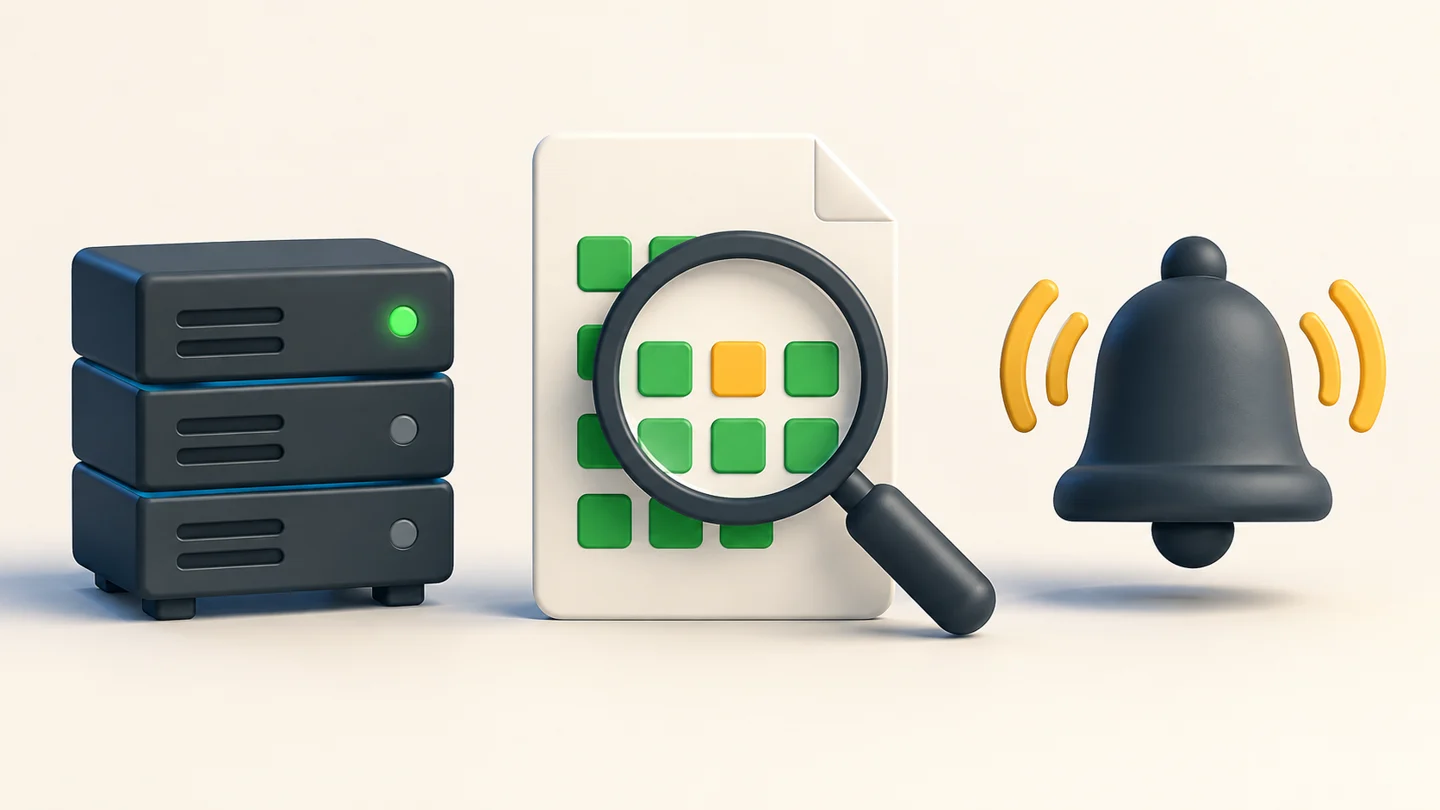
    A server indicator, a magnifying glass inspecting a response, and an alert bell represent three separate checks.
    Conceptual illustration created with AI: a responding server, a useful response, and a delivered alert are separate things to verify. This is not an Uptime Kuma screenshot.

    Configure a JSON query for the field you need

    For this test response, check whether checks.database equals ok. Set it through the JSON query monitor rather than searching the whole response for the word ok.

    Start the fixture from the download with python3 fixture.py. On the Linux host-network setup described in its README, create this monitor:

    Setting Lab value
    Monitor type HTTP(s) – JSON Query
    URL http://127.0.0.1:8765/healthy
    Method / accepted status GET / 200
    JSON query checks.database
    Condition ==
    Expected value ok (no quotation marks)
    Interval / retry interval 20 seconds / 20 seconds
    Retries / timeout / maximum redirects 0 / 5 seconds / 0

    The versioned editor source shows the query, condition, and expected-value inputs. Labels can change across versions. These are demonstration settings, not universal production defaults.

    1. Save the monitor and wait for a heartbeat against /healthy. It should report UP.
    2. Change only the URL path to /broken. Wait for a new heartbeat. The recorded result is DOWN.
    3. Repeat with /missing, then /login. Both were DOWN in the recorded run.
    4. Restore /healthy and confirm recovery in your instance. Record the observation in the included worksheet.

    If Kuma runs in an ordinary Docker bridge network, its 127.0.0.1 is the container itself. Follow the download’s Linux host-network example or choose an address reachable from your Kuma deployment. A connection failure caused by the wrong address is a different test.

    When keyword monitoring helps, and when it misses

    A keyword check helps when the response has a distinctive success marker. It is too broad when the same marker also appears in an error response.

    In the pinned implementation, keyword matching checks whether the response contains the configured text. The invert option reverses that condition. A JSON query evaluates the selected expression and comparison instead. See the monitor implementation.

    For an HTML page, choose text tied to the expected result and test an error page that keeps the usual navigation and footer. For a structured API response, select the field whose value changes when the dependency fails. Avoid treating a generic page title or the word ok anywhere in the body as proof of the whole app.

    The field still needs to mean something. A hard-coded "database": "ok" is just another green badge. In your own service, define what the endpoint must actually observe before it returns that value, and make that observation fail in a controlled test.

    Run the same failure lab yourself

    The download contains the fixture server, a dependency-free Python check, a script that creates the real Kuma monitors, both recorded result files, and an acceptance worksheet.

    Download the Uptime Kuma HTTP 200 lab ZIP. Extract it and open the uptime-kuma-lab directory in a terminal:

    python3 check-fixture.py

    That command exercises the HTTP responses with independent Python checks. To reproduce the actual Uptime Kuma results, follow the README’s disposable Docker setup and run run-kuma.cjs inside that container. The download distinguishes the two runs explicitly.

    The Kuma run used release 2.5.3, Node 22.22.3, SQLite storage, Linux host networking, and the pinned Docker image digest recorded in the README. It created 12 monitors and checked their first observed heartbeat states. It did not measure detection latency, exercise a real database, or send external notifications.

    Use the worksheet to record recovery and alert delivery in your deployment. Those cells are blank because this experiment did not test them.

    Verify the alert reaches someone

    A DOWN state is only one step in the operational test. Attach your intended notification channel to the monitor and check that a controlled failure reaches the person who must respond.

    1. Use a disposable endpoint or a planned test window. Record the healthy response and the expected failure before changing anything.
    2. Trigger the failure. Confirm that the monitor reaches DOWN after your configured retries, then confirm receipt in the attached channel.
    3. Restore the response. Confirm the monitor recovers and inspect the recovery notification if your channel is configured to send it.
    4. Record who received the alert and when. Separately decide how you will notice if the monitor’s own host becomes unavailable.

    For production, choose intervals, retries, and timeouts around the service’s response time and the interruption your team can tolerate. This lab’s zero-retry setting makes the example easy to inspect; it is not a paging policy.

    Checking one response field does not prove that a user can sign in, save a document, or complete a purchase. Where that workflow matters, add a separate test that performs it with safe test data. Define the expected outcome before running the test. The painted bullseye failure mode has the same problem: the success rule is too easy to satisfy.

    Questions about Uptime Kuma HTTP and JSON checks

    Why does Uptime Kuma show UP when my app is broken?

    Your monitor may be checking an HTTP status that the broken response still satisfies. In this lab, every fixture returned 200. Add a condition tied to the response field or user outcome you need, then verify it with a controlled failure.

    What JSON query should I use for a database health field?

    For this guide’s response shape, use checks.database, condition ==, and expected value ok without quotation marks. Adapt the field and value to your actual response, and test healthy, failed, and missing-field cases.

    Does a keyword check for ok prove that an API is healthy?

    No. In the recorded lab, the broken response kept a top-level status of ok while its database field said down. The keyword monitor stayed UP. Use a more specific marker or a query for the relevant field.

    Did this lab test notifications or a real database outage?

    No. It tested 12 real Uptime Kuma monitors against four synthetic HTTP responses. External notification delivery, recovery, real dependency failures, and complete user workflows require separate checks.

    Start with one monitor you already rely on. Write down what its green state should prove, then give it a response that violates that promise. Keep the response and the observed result so the next person can repeat the check.

    Disclosure: this article and its illustrations were prepared with AI assistance. The local experiment was executed during preparation; the exact scripts and outputs are in the download. Ranex publishes this guide for developers who want verifiable checks. No affiliation with the Uptime Kuma project is claimed.

  • Your SQLite backup says OK. Two rows are missing.

    Your SQLite backup says OK. Two rows are missing.

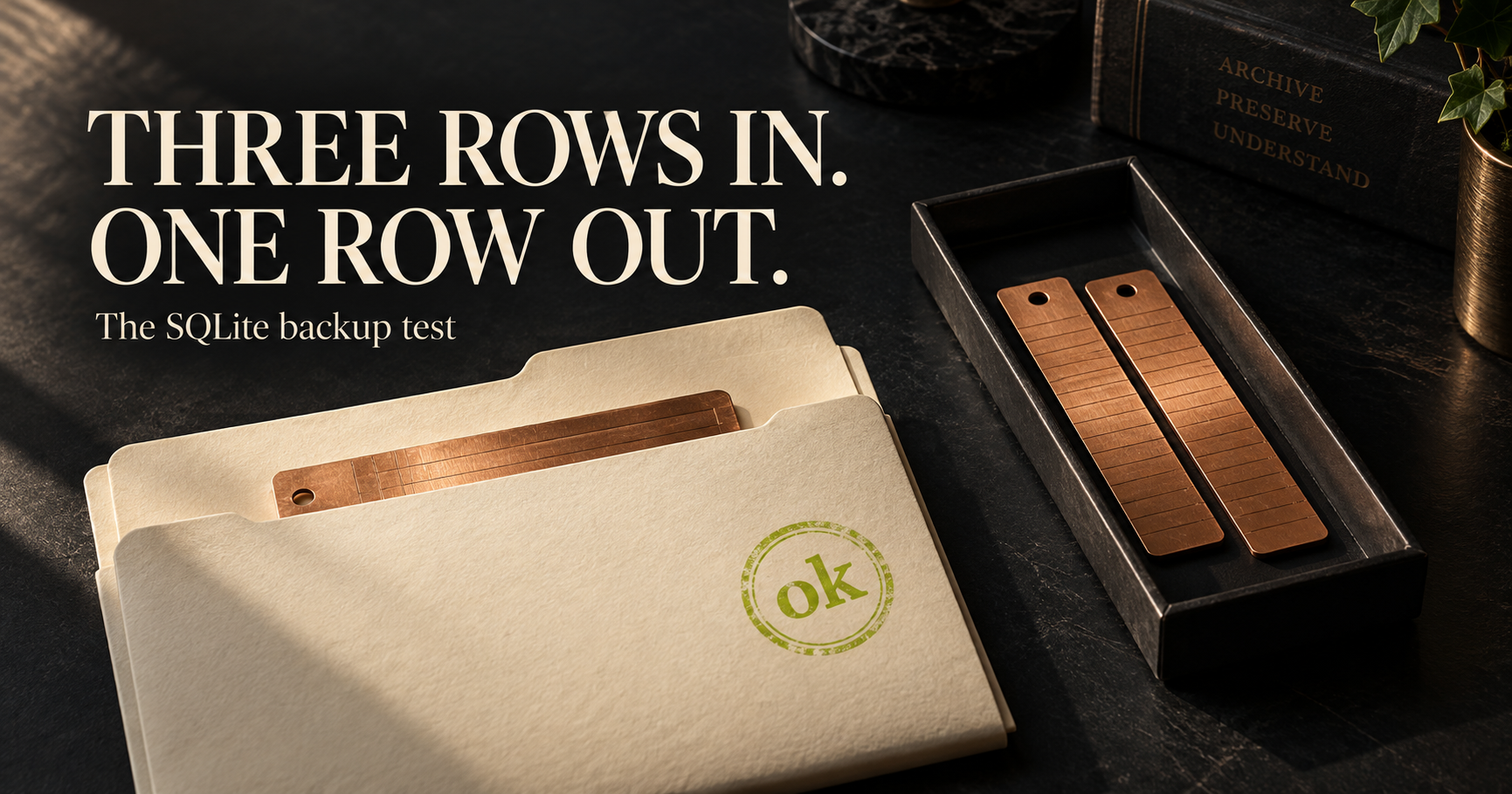
    A SQLite backup can pass PRAGMA integrity_check and still be missing records you committed.

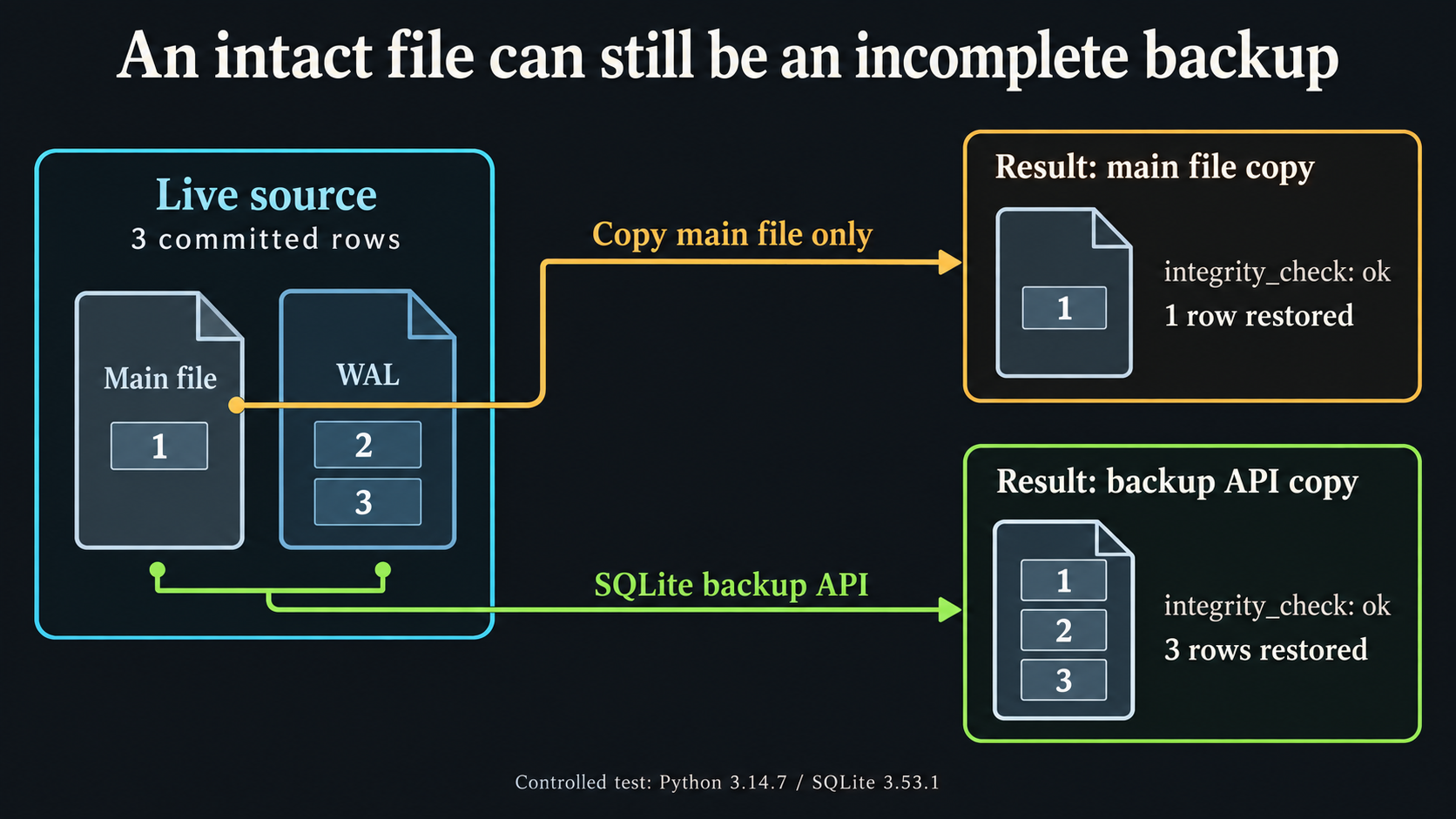
    The attached lab produces exactly that result. The live database has three rows. A copy of its main file has one row, and SQLite reports ok for both.

    If your backup job copies an app.db file while the application is running, check which journal mode it uses. With write-ahead logging, committed changes can still be in the WAL file.

    Download the SQLite backup and restore kit (ZIP). It includes a repeatable failure test, a backup utility, and the recorded results. Python 3.11 or newer with its standard sqlite3 module is enough. The lab runs offline with Python’s standard library.

    The file was readable. The recent records were absent.

    The fixture first wrote one row to the main database. It then enabled WAL mode, disabled automatic checkpointing for the test, and committed two more rows while keeping the connection open. No writes occurred during either copy.

    Database checked Integrity result Rows found
    Live source ok 3
    Main-file-only copy ok 1
    Restored copy made with the backup utility ok 3
    SQLite WAL test: copying the main file restores one row; the backup API restores three. Both pass integrity_check.
    Illustration of the recorded SQLite test. The source kept all three rows; the main-file copy omitted the two committed through WAL. Select the image to view it full size.

    The run used Python 3.14.7 and SQLite 3.53.1 on Linux on September 8, 2026. The kit’s result.json includes the actual row IDs and contents, not just the counts.

    Nothing in this example required a damaged file. The copy was structurally sound and old. An integrity check cannot tell you that an application record should have been there.

    Where the two rows went

    SQLite’s WAL documentation explains that writes can be committed to a separate log before a checkpoint moves them into the main database. The main file alone can therefore leave out committed work.

    The online backup API reads through SQLite to produce a database snapshot. The included utility calls that API through Python’s Connection.backup method.

    That is also why the test keeps the source connection open. Closing the last connection can change the WAL state. A demo that closes everything before copying can accidentally remove the condition it was supposed to test.

    Run the failure test first

    Extract the kit and read the two Python files. From that directory, run:

    python3 run-lab.py

    The script creates disposable databases. It makes the incomplete file copy, runs the backup utility, restores that backup to another path, and opens the restored database through a separate connection. It compares the restored rows with the source records.

    It also checks that the utility refuses an existing destination, rejects a missing source, rejects an invalid database, and cleans up its temporary files. Your application’s database is not used by this lab.

    Make a backup you can inspect

    For a database you choose, the separate utility takes a source path and a new destination:

    mkdir -p backups
    python3 sqlite-backup.py app.db backups/app-snapshot.db

    The destination directory must exist. The script refuses to replace an existing file, so use a new name for the next backup.

    It opens the source through SQLite in read-only mode, writes to a temporary file, runs an integrity check, and publishes the destination after those steps succeed. The output contains its size and a SHA-256 checksum. That checksum can help you check a later transfer; it does not establish that every application record is present.

    The final publication step uses a same-directory hard link. Use a filesystem that supports that operation. If it does not, the script fails without an overwrite fallback. The default backup progress limit is 30 seconds; --timeout 120 allows a longer backup. The later integrity scan is outside that progress limit.

    Check something your application cares about

    After restoring to a separate location, find a recent record whose ID and content you know. Check a relationship or attachment that the application needs. For the tiny lab, the expected rows are fixed before either copy runs. In your system, decide what must survive before judging the restore.

    The utility copies the main SQLite database only. Separately attached databases, uploaded files, configuration, and keys need their own handling. If your application documents a backup procedure, follow it. A generic database copy cannot replace application-specific recovery steps.

    This kit does not provide retention, off-site storage, encryption, or a scheduled backup service. The test also does not simulate writers changing the database during backup, disk failure, or a power cut.

    Take one backup your current job has already produced. Restore it away from production and check a recent record. If the file opens but the record is missing, your backup check has found work worth doing.

    The Gitea upgrade guide has a worksheet for recording recovery checks before a rollout. More runnable resources are collected at Open Source.

    Research, code, and editing used AI assistance. This article reports the attached controlled test. The original kit code is available under the MIT license.

    FAQ

    Can a SQLite backup pass integrity_check and still miss data?

    Yes. In this controlled WAL test, a main-file-only copy passed integrity_check but contained one of three committed rows. Structural integrity did not establish that the copy included the recent writes.

    What does the included backup utility copy?

    It uses the SQLite backup API to copy the main database into a new file. It does not copy attached databases, application uploads, configuration, or encryption keys.

    Will the backup script overwrite an existing backup?

    No. It refuses an existing destination. The lab checks that a second run fails without changing the first backup.

    Does the lab prove my application can recover?

    No. It checks a small SQLite fixture. Restore your own backup separately, verify recent application records, and follow the application's supported recovery procedure.

  • No Self-Approval: The One Rule That Survives Perfect AI

    No Self-Approval: The One Rule That Survives Perfect AI

    TL;DR: If the same actor produces the evidence and approves it, you do not have verification. You have agreement. The accountability apparatus starts outside the worker.

    Your agent hands over a diff, a test it wrote, and a green summary. You are tired, the deadline is loud, and every line looks plausible. Who is left to say the proof counts?

    In this note

    The producer cannot approve its own proof

    That is the rule. Whoever produced evidence cannot approve it. The README calls it one of the rules that makes a verdict trustworthy, and the reason is not subtle: one actor can write code, write the test around that code, and declare success. The target then follows the dart.

    Picture the merge you need to ship. An agent chooses the behavior, changes the implementation, changes the assertion, runs the command, and reports green. Nothing in that chain required a lie. The agent can be sincere. The result can still establish nothing beyond internal consistency.

    That is the third failure described in the README’s “The problem” section: the person making the change gets to paint the bullseye afterward. A green check is only useful when the thing it measured was not arranged by the party being measured.

    Competence does not dissolve a conflict of interest. A stronger model changes the quality of the work. It does not turn self-approval into independent approval. Give the producer perfect recall, flawless code generation, and a complete map of your repository — the boundary still matters because the roles did not change.

    This is why the rule survives the fantasy of perfect AI. The question is not whether a producer is clever enough to check itself. The question is whether your release process asks it to be the witness, the judge, and the beneficiary of the same claim. Would you accept that shape from a person?

    Freeze the target before the work starts

    Separation cannot begin at the final approval button. It has to reach back to the test. Ranex describes tests frozen before BUILD, generated in COMPILE, digested, and read-only to implementers. A test file changed by the implementation diff fails the gate.

    That gives you a sequence worth copying even if you never run Ranex:

    1. State the behavior before the implementation begins.
    2. Turn that behavior into an executable test before the producer can shape it.
    3. Show that the test fails against the pre-implementation tree.
    4. Keep the implementer from authoring or judging that test.
    5. Let a separate approval step decide whether the resulting evidence counts.

    The red-then-green step matters. A test that already passes before the behavior exists is not a target. It is an alibi. The no-self-approval rule matters beside it. A producer who can rewrite the test until it passes has moved the target even if the final command is real.

    The intended build loop draws the boundary again. A worker returns a diff. The kernel reads the diff on disk and runs checks; the worker summary is discarded. Workers do not merge. The README is explicit that models can propose, criticize, or translate, but cannot pass a gate.

    That full governed loop is designed, not built. Ranex is pre-release. What works today includes the narrower kernel rule: evaluation is a pure function of gate, evidence, subject, and approver, and no self-approval is listed as working behavior. Keep that distinction intact. A design is not evidence just because it is a good design.

    Check the separation before you trust green

    You do not need to replace your stack to ask this question. Take a recent agent-assisted change and trace the roles, not the tools.

    • Who produced the evidence for the claim?
    • Who approved that evidence?
    • Could the implementer author or edit the test that judged the change?
    • Did the test fail before the implementation existed?
    • Did someone inspect the artifact on disk rather than accept the worker summary?
    • Can the producer publish the result without a separate decision?

    If one actor owns every answer, your process has a green light but no independent basis for it. That is not an accusation. It is a missing control. You can fix it with role separation, frozen tests, and a reviewer who has authority to refuse the claim.

    Do this with agent sessions too. “Different prompt” is not a different approver when the same session can revise the evidence until it likes the result. Name the producer. Name the approver. Preserve the boundary.

    The current limit is identity, not the rule

    Here is the part you should not skip. Ranex compares producer and approver values, but the approver identity is unauthenticated today. --approver is a plain string. A producer can name someone else as the approver.

    Evidence signing establishes that the holder of a registered private key signed an evidence record. It does not establish who approved it. The no-self-approval comparison therefore works on unauthenticated strings. The README lists that as a known gap, plainly.

    So do not turn this post into a larger claim than the repository supports. The working rule blocks matching producer and approver values. It does not solve identity. The stamp stays a human’s, out of band, in the intended loop — and authenticating that human remains unfinished work.

    That stated limit is useful to you. It tells you where to inspect your own process next: a separation rule without trustworthy identities has a hole at the label. Keep the rule. Do not pretend the label closes the hole.

    The separate approver protects a bounded claim, not a promise that everything is right. A gate verdict has its own narrow meaning — and that is why the approval boundary matters.

    Questions people actually ask

    What is the no-self-approval rule?

    Ranex no-self-approval means whoever produced evidence cannot approve it.

    Why does no self-approval still matter with better AI?

    Separation of duties still separates production from approval when the producer is more capable.

    Is approver identity authenticated in Ranex today?

    Ranex does not authenticate approver identity today because --approver is a plain string.

    Try it. Break it. Tell me what broke. Read the MIT-licensed repository, then trace one change through your own approval path.

    Disclosure: this post was drafted with AI assistance. Every factual claim traces to the repository’s README or slice records — the same fact gate the product enforces on code. It ships only after Anthony’s own review.
  • uv locked vs frozen: the missing dependency test

    uv locked vs frozen: the missing dependency test

    You add a dependency to pyproject.toml. CI runs uv sync --frozen, exits successfully, and the package is still missing.

    There is a small, reproducible reason for that. --frozen uses the lockfile you already have. It skips the check that would tell you the manifest has changed.

    If your CI requirement is “the checked-in lockfile must match this project,” use uv sync --locked. In the test below, that command caught the mismatch.

    Download the uv lockfile lab (ZIP). It includes the script, recorded output, and an MIT license. You need Python 3.11 or newer, uv, and access to PyPI. You do not need Ranex.

    The failure, in five commands

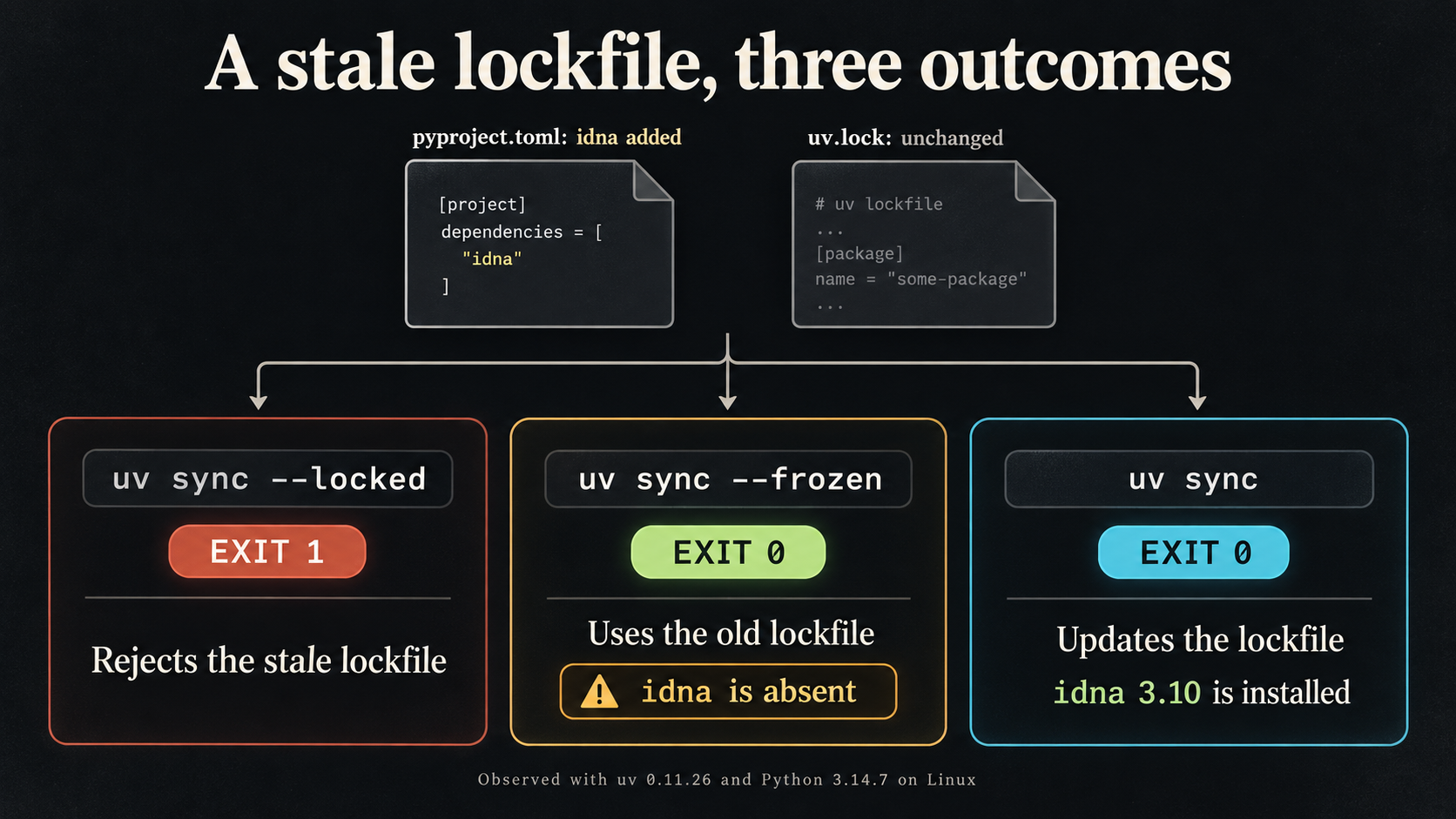
    The lab started with a project that had no dependencies and generated its lockfile. It then added idna==3.10 to the manifest without updating that lockfile.

    Command Exit code What the lab observed
    uv lock 0 Created the original lockfile before the manifest edit.
    uv sync --locked 1 Rejected the stale lockfile. Its bytes did not change.
    uv sync --frozen 0 Accepted the old lockfile. The new dependency was absent.
    uv sync 0 Updated the lockfile and installed idna 3.10.
    uv lock --check 0 Accepted the refreshed lockfile.
    Stale uv lockfile test: locked exits 1; frozen exits 0 with idna absent; ordinary sync updates the lockfile and installs idna 3.10.
    Illustration of the recorded uv test. File icons are schematic; the lab added idna==3.10 to an initially dependency-free project. Select the image to view it full size.

    The run used uv 0.11.26 and Python 3.14.7 on Linux on September 8, 2026. These are the versions tested. The download keeps the exact command arguments, exit codes, and lockfile hashes in result.json.

    Run it without touching your repository

    Extract the kit, read run-lab.py, and run it from the extracted directory:

    python3 run-lab.py

    The script makes its own temporary project and cache. It uses your current Python interpreter, downloads idna from PyPI into a temporary virtual environment, and removes the lab files when it exits. It does not inherit your private index settings or UV_* environment overrides.

    Look for these two fields in the output:

    "idna_present_after_frozen": false,
    "idna_version_after_sync": "3.10"

    The script checks the installed package separately from uv’s exit status. That is how it catches the successful sync with a missing dependency.

    There is one detail worth keeping if you adapt the test: inspect the virtual environment’s Python directly. An ordinary uv run can update the lockfile and environment before running your check, which would change the condition you meant to inspect.

    Why both flags exist

    The official uv documentation distinguishes checking a lockfile from using one. --locked raises an error when the lockfile needs an update. --frozen skips that freshness check. Neither command promises to do the other’s job.

    A frozen install can be intentional when a workflow is meant to consume an already approved lockfile. The trouble starts when you treat its success as evidence that the current manifest and lockfile agree. That was never the check you asked it to run.

    Fix the mismatch before changing the CI flag

    For a project where the dependency edit is intentional, update the lockfile locally and review the change:

    uv lock
    git diff -- pyproject.toml uv.lock
    uv sync --locked

    Commit the manifest and lockfile together. Once CI has checked out that commit and installed your chosen Python and uv versions, make uv sync --locked a step that must succeed before the application tests run.

    If you only need to validate the lockfile, uv lock --check is the smaller command. It does not replace running the application tests or checking what ends up in a built container.

    Do not replace a failing locked sync with a frozen sync just to clear the failure. First check whether the dependency edit was intended and whether the corresponding lockfile change was committed.

    What this test covers

    This is one project with one newly declared dependency. It does not test every uv release, workspaces, optional groups, private indexes, or your build image. The timings in the raw output are incidental; this is not a speed comparison.

    The useful check to take back to your repository is simple: add a dependency without refreshing the lockfile on a throwaway branch. Does your required CI job reject the mismatch? Check that before assuming a green install tested it.

    For a broader dependency decision, use the repository evaluation guide. More practical resources live at Open Source.

    Research, code, and editing used AI assistance. Results come from the attached local run. The kit is free to use under its MIT license.

    FAQ

    What is the difference between uv locked and frozen?

    In this lab, --locked rejected the stale lockfile. --frozen used the existing lockfile without checking whether it matched the edited project manifest.

    How do I fix a stale uv lockfile?

    Review the dependency change, run uv lock, inspect the diff, and commit pyproject.toml and uv.lock together. Then rerun uv sync --locked and your application tests.

    Does the lab change my project?

    No. It creates a temporary project, virtual environment, and cache, then removes them on exit. It requires Python 3.11 or newer, uv, and network access to PyPI.

  • Six Roads to a False PASS (All One Root Cause)

    Six Roads to a False PASS (All One Root Cause)

    TL;DR: Signed, subject-bound evidence can still prove the wrong action; bind each claim to the exact command before execution. The parent slice log asks what the credential was actually about.

    You have a credential check. It is signed, valid, and attached to the right commit. Before you trust that green light, what was the credential actually about?

    In this note

    This is where a lot of pipelines quietly fail. They validate the badge and never validate the job the badge claims to represent.

    I hit that in Ranex with a record for true. The record could be correctly signed, bound to the subject tree, and accepted as proof that tests had executed. Nothing in that sentence should make you comfortable.

    A valid credential can prove the wrong thing

    Validating a credential is not validating what the credential is about. A signature can prove who recorded a command and which subject it named; it cannot turn true into a test suite.

    Before SLICE-003, evidence satisfaction came down to a claim name, a subject digest, and exit code zero. The evaluator never looked at what ran. A worker could produce a signed, subject-bound record under the claim tests-executed while running true.

    That is a clean record of an empty action.

    Your equivalent might not be true. It might be a smoke check treated as a release test. A scanner that reports success when it scanned no files. A deployment receipt that names a revision but never proves the artifact reached production. The shape is the same: the system checks that somebody presented a credential, then assumes the credential carries the meaning it wanted.

    Do not let a label do the work of evidence.

    Ranex changed the claim shape in the committed gate catalog. A claim declares its required argv as a list, not a shell string. The kernel computes a digest of canonical argv bytes and compares it with the signed command digest in evidence. The readable command remains signed too, so a matching digest cannot be paired with a swapped human-readable field.

    The result is narrow and useful: a signed record of true no longer satisfies tests-executed. The catalog declares the command that can satisfy the claim.

    That is a kernel decision, not a convention in a build script. The check does not need to trust the worker summary.

    The binding held. The boundary around it did not.

    Six independent audits failed to break the claim-command binding itself. The same audits found six ways to get a false PASS around it because observation still happened inside state the observed party controlled.

    This is the uncomfortable part. A strong control can be real and still be surrounded by weak seams. The right response is to name precisely what it does, then follow the attacker to the next boundary.

    The slice also re-proved criteria one through nine by mutation. Each safeguard was deleted from src/ in turn, and its covering test had to go red. That work established that the binding was enforced where it claimed to be enforced.

    Then the audit moved outward.

    One bypass inherited an environment that retargeted the bound binary. A PYTHONPATH setting and a sitecustomize.py outside the repository could make the bound command exit zero without running. The argv, digest, absolute interpreter, tree, and signature remained truthful.

    Another let a file Git was told to exclude decide the outcome. Another used a clean filter that made a modified tracked file hash as if it were the committed blob. Others targeted the trust-root blob, the git executable selected from an editable path, or an untracked empty directory that Git cannot represent.

    Six roads. One root cause: the thing being measured still controlled the place and tools used to measure it.

    The slice did not pretend those paths were closed. They were reproduced, recorded, and assigned to the next slice. That is a better status than a clean report that has never tried to drive around the guardrail.

    Shapes to hunt for before your next PASS

    Look for the seam between a declared command and the process that actually runs. Attackers do not need to defeat a digest when they can influence the interpreter, environment, filesystem, or tool that feeds it.

    • A claim name that has no pinned argv, test-plan digest, or other executable definition.
    • A command comparison performed as a shell string rather than a structured argument vector.
    • A signed digest that does not cover the human-readable command or executable path.
    • Environment variables inherited by the measured command.
    • Tools resolved from ambient PATH or from a directory the observed party can write.
    • Ignored, excluded, or untracked files that can affect the measured result.
    • Git configuration, filters, replacement refs, or other local state that can change what “committed” appears to mean.
    • A passing test that removes a safeguard only in a mock instead of from the running path.

    For each shape, write down the proposition you need to prove. “The record is signed” is not enough. “The catalog-bound argv ran against the subject in a measurement environment chosen outside the observed party” is a proposition you can test.

    That sentence is longer because the boundary is larger. Good. Short security claims often hide missing nouns.

    Freeze bypasses instead of filing them away

    When you reproduce a bypass, freeze it as a strict expected-failure test with a green control beside it. That keeps the hole visible without pretending it is fixed.

    SLICE-003 did exactly that for the false-PASS paths around the binding. Each one is a strict xfail. Each has a control that proves the test can pass when the vulnerable condition is absent. The expected failure will fail loudly on the day the path is actually closed.

    This matters because a plain issue can go stale, lose its reproduction, or be mistaken for a theoretical concern. A strict expected failure runs in the suite. It carries the attack shape forward with the code.

    There is a trap here: an expected failure without a green control can pass vacuously. The test might not run the relevant code at all. You have traded one invisible gap for another. Put the control beside the bypass. Make both explain themselves.

    Also state the boundary plainly. SLICE-003 did not claim output digests, authentic approver identity, or key containment. A command matching the bound digest can still be trusted to have done what its name suggests. That limitation was recorded rather than decorated with an unchecked field.

    Ranex is pre-release. The claim-command binding is built; the surrounding observation hardening was next-slice work in this record. “Designed, not built” is a useful sentence when a control stops at a real boundary.

    Questions people actually ask

    These questions help you bind a CI claim to the command that produced it.

    How do you bind a CI claim to the command that produced it?

    The committed catalog declares the argv that satisfies a claim, and the kernel compares a digest of that argv with the signed evidence.

    Why does a signed record of true not prove tests executed?

    A signature and subject digest establish who recorded an observation and which tree it names. They do not establish that the command was a test run.

    What should happen to bypasses found around a control?

    A team should reproduce bypasses, keep a green control beside each one, and freeze them as strict expected-failure tests until the next slice closes the root cause.

    Make your next credential earn its label

    Pick one important claim in your pipeline: tests executed, artifact scanned, release approved, migration applied. Find the credential that satisfies it. Now write the exact action that credential is supposed to represent.

    Bind that action before the worker runs. Verify the binding after it returns. Then try to go around it through the environment, the executable path, the working tree, and every ignored input you can name.

    The reproductions live in the Ranex repository, under docs/slices/done/. Take the shape, not the marketing.

    Try it. Break it. Tell me what broke. If this gave you a useful test, star the repository and send an honest critique. A false PASS found before release is a gift.

    Disclosure: this post was drafted with AI assistance. Every factual claim traces to the repository’s README or slice records, the same fact gate the product enforces on code. It ships only after Anthony’s own review.
  • Open Source Signal, Week 1: What Held Up, What We Corrected, What We Left Out

    Open Source Signal, Week 1: What Held Up, What We Corrected, What We Left Out

    The week the license fine print became the headline

    You spent part of this week clicking "merge" on dependency bot PRs before coffee, the way you do every week. Nothing unusual there. What was unusual was how much of the actual conversation in your feeds had nothing to do with releases and everything to do with license text: AppFlowy-Cloud getting archived, AFFiNE's split-license repo raised questions, Outline's BSL status coming up once someone read the LICENSE file.

    And then there was OpenMAIC, a repository that landed in the team's adoption discussion by midweek. Here's the honest answer about it: GitHub's own file detection classifies OpenMAIC's LICENSE file as MIT. That's the whole claim. If you saw someone describe a license swap with specific dates attached, ask them for a dated source.

    None of this is dramatic on its own. But a week where three separate projects raised license questions, in three different ways, is worth noticing as a pattern rather than three coincidences.

    A signal system is judged by its corrections, not its hits

    Anyone can publish a list of releases. Copy the changelog, add a sentence, done. That's not a signal system, that's a mirror. What makes a roundup worth trusting isn't how many items it names: it's whether it tells you when it was wrong, what it left out, and why.

    So the corrections log below isn't a footnote you can skip. It's the part of this post doing the most work. If AppFlowy-Cloud shows up on last month's shortlist you saved, that shortlist is stale as of September 1. If someone told you AFFiNE is "just MIT," that's incomplete, and the incompleteness matters if you're planning a production deployment. Reports come from the worker. Verdicts come from a judge. The correction is where the judging shows up in public.

    How items earned inclusion

    Nothing here is new research. Everything in this roundup was checked during Days 1 through 6 of the week, then re-verified against primary sources before publication, because facts about licenses, security advisories, and release notes move, sometimes within days.

    Three filters decided what made the cut. First, primary sources checked the same morning as the claim: a GitHub release page, a raw LICENSE file, a security advisory, not a summary of one. Second, a claim gate: every sentence in this post that could change a decision you make has to trace back to something in the verification packet, or it doesn't get written. Third, no item made it in for recency alone. A release with no listed changes doesn't count as a highlight just because it's this week's.

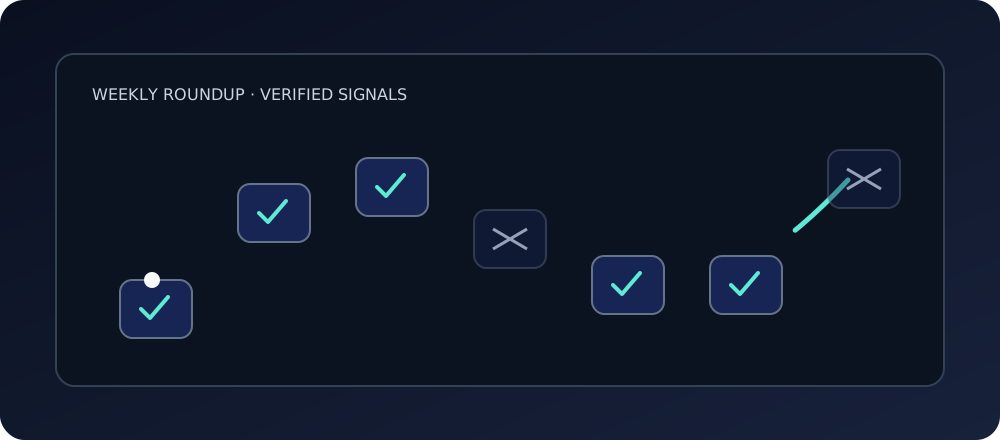
    Animated weekly roundup: a thread travels an arc of seven panes, marking the verified ones and bypassing the excluded

    Proof: what held up

    Re-verified against primary sources on September 2, 2026; volatile facts re-checked again before Sunday publication.

    A note on scope: the links below point to posts published earlier this week, and each of those carries its own checked-at date. Trust that date for its facts, not this one.

    Verified highlights

    • AppFlowy-Cloud was archived September 1, 2026. Its README now calls it legacy and unmaintained, and states that production self-hosting has moved to a closed-source commercial fork. The shortlists that still name AppFlowy Cloud are stale as of September 1. AppFlowy-Cloud repository
    • AFFiNE's license is split, not uniform. The repository tree describes itself as MIT for the community edition, but packages/backend and packages/common/native sit under a separate license whose server file requires a valid AFFiNE Enterprise Edition subscription for production use. Root LICENSE · Backend server LICENSE
    • SiYuan v3.8.2 (August 30) fixed a critical stored-XSS advisory. GHSA-7h8j-qw37-w46g, CVSS 9.0, affects 3.8.1 and earlier. The advisory has no CVE ID assigned yet and may be revised. Treat the severity number as current, not final. Security advisory
    • Gitea v1.27.3 (August 29) shipped a SECURITY-led release. Package token scopes, attachment path enforcement, Actions artifact signatures, fork-PR trust boundaries, and hook permissions all changed. If you're self-hosting below 1.27.3, this is the release you're behind on. Release notes
    • Keycloak 26.7.3 (August 31) closed a CVE batch. Three worth naming are CVE-2026-35563 (LDAP hostname verification), CVE-2026-16093 (signed-JWT assertion policy bypass), and CVE-2026-16089 (authorization code retargeting). Release notes

    Corrections log

    1. Shortlists still calling AppFlowy Cloud "the open-source Notion answer" are stale as of September 1: it's archived.
    2. Outline v1.10.0 is Business Source License 1.1. Its own LICENSE file states plainly that it "is not an Open Source license," with a Change Date of 2030-09-01 before it converts to Apache-2.0. Outline LICENSE
    3. "AFFiNE is just MIT" is incomplete: the Enterprise Edition server file requires a paid subscription for production use.
    4. NocoDB's Sustainable Use License is not OSI-approved, by NocoDB's own documentation, and the LICENSE file itself never claims to be open source. NocoDB license docs · LICENSE.md
    5. The Day 2 worked example's repository numbers (commits, issues, pull requests) were re-checked and updated before this publication because they'd already moved within days. A snapshot without a date stamp is a snapshot that rots.

    Watchlist, and what we left out

    • Kubernetes 1.37 missed our UTC release window by hours: published 2026-08-26T16:29Z, already August 27 in Manila. It stays a watchlist note, not a highlight; we're not treating it as material-impact this week. Release notes
    • Wiki.js 3.x is beta, marked "Not for production use," while v2.5.314 remains the production Latest release.
    • n8n@2.37.7 published with no listed features, fixes, or security notes attached. Recency without documented impact, so it doesn't earn a highlight slot. Release
    • Three items carry date-bound caveats worth repeating: the SiYuan advisory has no CVE ID yet and advisories get revised; the Day 6 GitHub CLI responsiveness numbers were a September 2 hand sample of the nine newest issues, bot median around 3.5 minutes, human maintainers visible on two of nine; Uptime Kuma's v2 removal of JSON backup was checked on Day 5 only. None of these are permanent facts. They're facts as of a specific day.
    • Wiki.js install docs never loaded for verification because the page is JavaScript-rendered, so they stay unverified rather than assumed.
    • Excluded outright: Outline (BSL, not open source), AppFlowy-Cloud (archived), and anything that wasn't verified during Days 1 through 6.

    This week's watchlist is shorter than some weeks. That's not an oversight: a quiet section stays short, and length here isn't padded to look thorough.

    Which check will you adopt next week?

    You don't need to run every check in this series at once. Pick the one that matches whatever you're actually doing right now (evaluating a new dependency, self-hosting something, or just trying to figure out if a tool is still maintained) and run that one this week.

    All six live under the open-source field notes hub if you want the full week in order.

    FAQ

    Will you do this every week?

    That's the intent: a Sunday roundup, built from what got verified Monday through Saturday, with corrections logged in the open. Whether it continues depends on whether it stays useful to you and whether the verification process holds up under a weekly cadence without cutting corners. If it starts feeling padded or rushed, that's a sign to slow down or stop, not to keep shipping anyway.

    What does corrections mean here?

    It means a specific, dated log of claims that changed, were previously incomplete, or turned out wrong once checked against a primary source, not a vague "we try to be accurate" disclaimer. This week's log has five entries above. Some weeks will have more, some fewer. The number isn't the point; the willingness to publish it is.

    Disclosures: ranex.dev is Anthony Garces's site, and Leitir (the tool used in Day 1's provenance walkthrough) is his tool. That post is a methodology walkthrough, not a ranking or an independent endorsement. Research and drafting for this series were AI-assisted; human review is required before anything here gets published.

  • Finding an Open-Source Project Worth Your First Contribution

    Finding an Open-Source Project Worth Your First Contribution

    You find a repository with a "good first issue" label on something that looks approachable. You read the issue, read the linked file, write a careful patch, and open the PR. Then you wait.

    A week passes. You check the tab once a day, then once every few days, then you stop checking as often because checking and finding nothing feels worse than not checking at all. Four months later you notice the tab is still open. No comment, no review, no closure: just a PR sitting in a queue you can't see the size of. You close the tab yourself, quietly, and move on to something else.

    Nothing about that story is unusual. It's also nothing you could have known from the label, the star count, or the README. The label said "good first issue." It said nothing about who reads issues, how often, or whether an external PR has ever actually been merged there.

    So before you spend an evening on a patch: what could you have checked beforehand (in ten minutes, by hand, on the repo's own issue and PR history) that would have told you something closer to the truth?

    Lesson

    A label is a claim a project makes about itself. A merged PR is a thing that actually happened. Those are different kinds of evidence, and only one of them tells you what happens after you hit submit.

    "Good first issue" is metadata someone attached, possibly months ago, possibly by a maintainer who has since moved to other work. It doesn't tell you the median time between opening a PR and getting a human response. It doesn't tell you whether the last five PRs tagged that way were merged, ignored, or auto-closed by a stale-bot. In the worked example later in this post, the open "good first issue" search on a genuinely active project returned zero results at the moment I checked it, while real external contributions, unrelated to that label, were being reviewed and merged in under three weeks.

    That gap is the point. Labels are marketing, even when nobody intends them that way. They're a snapshot of intent, not a running log of behavior. Issue threads and merged pull requests are closer to a running log: timestamps, who commented, what they said, how long it took. Reading five of those by hand takes less time than writing the code for your first PR, and it tells you more about what happens after you submit it than any badge on the repository.

    Checklist: five signals worth checking by hand

    1. Time-to-first-response, but separate bot from human. Open the repo's most recent issues and note who leaves the first comment and how fast. Many projects run triage bots that reply within minutes with a template: label suggestions, a request for more info, a note about backlog policy. That speed is real, but it isn't review. Scroll past the bot comment and find the first comment from an actual maintainer account. That gap (sometimes minutes, sometimes days) is closer to what you'll experience once your PR is up. Check the commenter's role badge (MEMBER, CONTRIBUTOR, or nothing) if the platform shows one.

    2. External-PR merge behavior. Search merged pull requests filtered to something like an "external" label, or scan recent merged PRs and check whether the author is listed as a core team member. For a handful of them, note the opened date and the merged date. A consistent multi-week gap tells you more than a single fast example. A single fast example tells you almost nothing on its own.

    3. Maintainer activity and release cadence. Look at the commit history on the main branch and the release/tag list. Are there commits in the last week? Do releases land on something like a monthly rhythm, or is the last tag from a year ago? Cadence is a proxy for whether anyone is actively steering the project right now, rather than whether it once was.

    4. CONTRIBUTING.md promises versus automation. Read the actual contributing guide. It's often not at the repo root. Note what it asks for (an issue first? explicit maintainer sign-off before you write code?) and whether a bot enforces that ask, or whether it's just a suggestion. Then look for a case where a maintainer overrode the stated rule for something small, like a typo fix. That tells you whether the written policy is rigid or whether maintainers use judgment.

    5. Issue-triage patterns. Look at labels on the newest issues. Do they get sorted into categories (bug, enhancement, priority) shortly after opening, or do they sit unlabeled? Systematic triage is a weak but real signal that someone is actively managing the queue, rather than occasionally glancing at it.

    None of these, alone, tells you what will happen to your specific PR. Together, they tell you more than a badge does.

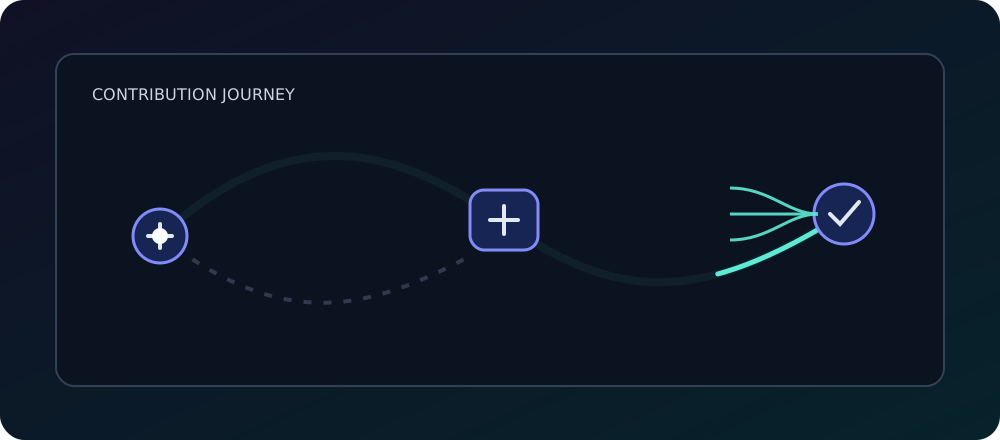
    Animated contribution path: a change travels from a fork through review into a merged braid while an unmerged path fades

    Proof

    Checked at: September 2, 2026. A nine-issue and six-PR hand sample, drawn from the newest open items, so it is right-censored where responses had not arrived at fetch. This is a point-in-time reading, not an endorsement of any project named below.

    Worked example: cli/cli, GitHub's official CLI ("gh is GitHub on the command line," per its README).

    Bot vs. human. Issue #14317 was opened 2026-09-02 at 06:01 UTC; a bot commented at 06:05 (~4 minutes) suggesting labels. Issue #14308, opened September 1, got a bot reply in about 3 minutes, and its backlog template states plainly that the team is not committing to implement the request and that external contributions aren't being sought without a "help wanted" tag. On the human side: #14253, opened August 24, got its first maintainer (MEMBER) comment on August 28, about 3.9 days later, asking for a screenshot. #14223, opened August 21, got its first MEMBER comment on August 28, about 6.7 days later. Across the nine newest open issues at the time of the check, bot-comment median latency was roughly 3.5 minutes; human maintainer comments appeared on only 2 of the 9.

    External merges. The "external" label marks PRs from outside the core CLI team; 920 merged PRs carry it. #14154 (opened by scarletkc) went from open on August 15 to merged September 1, about 17 days, credited as a first contribution in the v2.99.0 release notes. #13787 (kofuk) ran roughly July 3 to July 16, about 13 days, with a review comment reading simply "Thanks LGTM." #13886 (kobihikri) ran July 15 to July 21, about 6 days.

    Activity. v2.99.0 released 2026-09-01, following a roughly monthly cadence: v2.98.0 on August 20, v2.97.0 on July 31, v2.96.0 on July 2 (full release history). Trunk commits landed September 2, September 1, August 31, August 28, August 27, and August 26.

    Written policy vs. exceptions. The CONTRIBUTING guide says the team accepts PRs for issues tagged "help wanted," and asks contributors not to open PRs without that tag or explicit acceptance criteria. External PRs against core issues won't be accepted otherwise. Yet #13940, a typo fix, got a bot warning about the missing help-wanted issue and a four-day auto-close notice, and maintainer williammartin approved and merged it the same day, July 22. The project's own triage doc says tiny, obviously-mergeable fixes like typos mean review, test, and merge. Automation sets the default rule; a human made the exception.

    Triage. The newest open issues carry labels like needs-triage, enhancement, bug, and priority-3 (#14317, #14308, #14297): a pattern, not a promise.

    Contrast, no verdict. jqlang/jq shows 117 open PRs, the oldest sorted by creation dating to #458 from 2014 and #1103 from February 2016. That is a dated fact, not a judgment. Years-open PRs can reflect real design disagreements rather than neglect, and this article draws no conclusion about jq either way. Its absence from the checklist above means nothing about the project.

    A few things worth saying plainly: the names here are illustrations, not recommendations. Past responsiveness is not a prediction of what will happen to your PR. cli/cli is staffed by GitHub employees, so its latencies are not representative of a volunteer-run project. Treat that difference as real, not a footnote. No project here is called friendly or unfriendly. Maintainers are people with variable time and energy, and the numbers above describe a queue, not a character trait.

    Try it tonight

    Before you write a line of code for a project you're considering, spend twenty minutes on its issue tracker and PR history instead. Read five recent issues and note who responds first (bot or human) and how long it takes. Find four merged external PRs and note the gap between opened and merged. Time the first human response, not the first automated one. That's the whole exercise, and it's cheaper than a four-month wait.

    If you're trying to decide whether to depend on a project rather than contribute to it, the evidence you'd gather is nearly the same, aimed at a different question. See oss-signal-assess-new-github-repo for that version, or browse the rest of the open-source signal series.

    FAQ

    How long should a first PR take to get reviewed?

    There is no fixed answer. In the sample above, external merges landed in roughly six to seventeen days, but a hand sample is not a distribution. Judge each repo from its own recent threads, not from a number in this article.

    Are good first issue labels useful?

    In cli/cli, the open good-first-issue query returned zero results at the time of this check, while real external PRs were being merged. The label is a claim a project makes about itself; issue threads and merged PRs are things that actually happened. Some projects do maintain these labels carefully. Verify per repo.

    Is cli/cli a good first project for me?

    That framing does not have a yes-or-no answer here. cli/cli is used as an illustration, not an endorsement, and it is staffed by GitHub employees, so its response times are not typical of volunteer-run projects. Your constraints (time, skill, interest) decide, not this article.


    Disclosure: this is a first-party piece from the ranex.dev open-source signal series. Ranex has no affiliation with cli/cli, GitHub, or the jq project. Research and drafting were AI-assisted; human review is required before publication.